
Keyboard Reviews for Authors (and gamers?)
My thoughts on 3 mechanical keyboards I've tried

I’ve decided to start a bit of a journey on Stubstack, and see where it goes. This is an article I’ve been thinking of writing, and decided to use my day off from the day job to do it.
As writers, the keyboard is (for many of us) our portal to the minds of our readers. We spend hours upon hours with our fingers rapidly typing (or slowly pecking), until we finish the work we’re ready to send out into the world. I think it’s important, as technology improves, to make sure we’re using the right tools.
I’ll preface by saying that, obviously, these are my opinions. Also, I have absolutely no affiliation with the company whose keyboards I looked at. I purchased them all for myself at full price as a consumer. So, there’s no plus here for me, other than knowing I’ve hopefully spread some useful knowledge.
So, let’s get started. All of these keyboards are from Keychron (https://www.keychron.com/). I chose them for my exploration of keyboards after years of being a gamer, and relying purely on mechanical keyboards. Now, as I get older, the travel and response of the keys gets more important with arthritis forming in my hands. Comfort is important.
A few things that apply to all of these. They’re all capable of Bluetooth/Wireless connections, but due to latency, when I’m at home, I use them wired to my desktop computer. There is one I use wireless, and I’ll cover that when I get there.
One of the advantages to Keychron keyboards, which I’m sure exist elsewhere, is that the keys on all of the keyboards I’ll go over, are hot-swappable. Meaning, that if a letter or two start to go bad, and don’t respond as well anymore, no need to buy a whole new keyboard. Just pull and replace the switches (also available from Keychron). It’s as easy as pulling out a plug and putting a new one in (using a key puller, of course). So, there’s an up front investment, but long-term savings if you love the layout and feel.
Keychron K10 Pro QMK/VIA Wireless Mechanical Keyboard
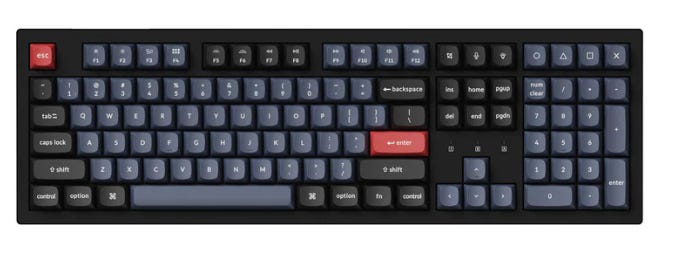
Price at the time of writing: $87.20.
The first keyboard on the list is the Keychron K10 Pro. I purchased this one fully assembled, with hot-swappable keys. It came with K Pro Red switches (here’s an article on switch types if you’re not familiar with this level of detail). The red switches are really more gamer oriented, but, I find there’s a lot of translation between gaming and typing, so I gave it a go.
This is a 100% size keyboard, yes, there are other types, and it feels like it. The key response is good, and works great for gaming and writing. The keys are linear and smooth, so there’s no “clicky” sound like people tend to associate with mechanical keyboards. It feels good, and it’s responsive, but I found that I was mistyping a lot, and my fingers would slip between the keys and hit two at once sometimes. That is likely due to my aging hands, but something to keep in mind as we move forward.
I highly recommend this keyboard if you’re a younger person with “above average” sized hands (you wear an XL glove size). If you’re a bit older, or you have travel issues with your hands, like I’m starting to, keep reading.
Keychron K11 Max QMK/VIA Wireless Custom Mechanical Keyboard
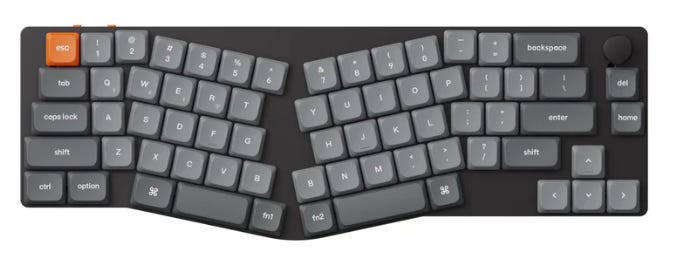
Price at the time of writing: 84.15
The next one was a shot in the dark. The K11 Max Alice layout keyboard was something new. I had the old Microsoft Ergonomic keyboard back in the day, and I’ve tried multiple split keyboards since then, but none of them stood up to the punishment I dish out when typing. I saw this one, and gave it a go.
This one has low profile Gateron switches, and again, can be wired, or supports up to 3 different Bluetooth connections. I went with the red switches again. The Bluetooth pairing is solid, as I used it travelling a few times, and it’s also capable of connecting to a 2.4 GHz wireless network.
I wanted to like this one, and I used it for several weeks, but I can’t recommend it. The layout is comfortable once you get used to it, but the low profile keys don’t work for me. Plus, the lack of an END button hindered my normal process. I frequently use Home and End in conjunction with the arrow keys when I’m writing to quickly traverse a line without having to move my hand to my trackball/mouse, and that was out with this keyboard.
So, if low profile is your thing and you don’t mind the lack of an End key, give it a try.
Keychron K2 HE Wireless Magnetic Switch Custom Keyboard
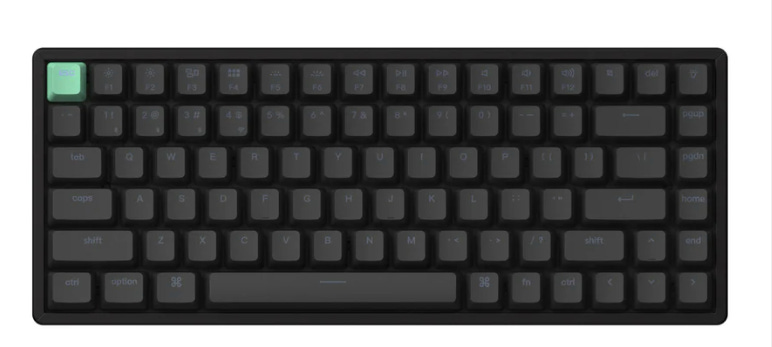
Price at the time of writing: $130
Now we’re entering the next generation. Magnetic switches. The K2 HE is equipped with Gateron Double-Rail Magnetic Nebula switches. That’s a mouthful, but I’ll just say that it’s solid. The double-rail means that instead of a single pressure point in the middle of the key, which is what you typically see (a single stud sticking up), these keys ride on a rail on each side of the key, spring loaded, giving the key a solid feel no matter where on the key surface you hit it.
It’s a linear switch, so no clicky noises, and the travel is smooth and solid. Right now, this is my keyboard of choice. I initially supported this one during their Kickstarter, so I got an early version, and I love it. I still use the K10 Pro for every day tasks on my home PC, which is a gaming rig as well as my writing PC, but when it comes time to write, I swap out the USB-C plug, and plug this one in. The plug is on the keyboard itself, it’s not hard wired, so swapping out any of these keyboards is simple, and fast.
Another feature of the new magnetic keyboards is something I haven’t played with yet, but you can actually adjust the actuation point. That’s the point where the key recognizes you’ve pressed it. If you take your keyboard, and slowly push the key until letters start appearing in notepad or something, that’s the actuation point. For a standard mechanical keyboard, that point is contact, because that’s how the keys work.
For this keyboard, and other new generation magnetic/mechanical keys, it can be modified, so you don’t have to “bottom out” the key for it to register a keypress. I like the current resistance of the keys, so I doubt I’ll mess with it unless I’m sure I can return it to default settings if I screw it up.
Another huge plus for me as a programmer is that the source code for the K2 HE software is open source, and available for download. That gives me some reassurance that it’s solid, and isn’t hiding anything.
This keyboard is also different in that it’s a 75% keyboard. In a nutshell, that means your fingers don’t have to go as far to hit the keys. I was skeptical at first, but I’ve found that I’m making fewer simple typographic errors, like missing a key, or my finger hitting two keys at once. I would say it’s increase my production speed when writing by about 25% based on some rather unscientific, but in my mind reliable, tests. That’s purely the speed of getting the ideas out of my head and onto the page.
The placement of the Home, End, and Delete keys does take some getting used to, but it wasn’t a big deal for me.
I also picked up the travel case for this one as a part of the Kickstarter, and I’m glad I did. For writing on the go, I use a Lenovo Yoga 9i 14” laptop. As always, the Lenovo keyboard is great, but, my hands constantly trigger the large touchpad/mouse, so I needed a keyboard, and this one is it. It pairs easily via Bluetooth, and so far in any environment where I’ve used it, I’ve encountered zero latency. It’s also capable of a 2GHz wireless connection with a 1000 Hz polling rate. Which is very good.
Summary
I think it’s fairly obvious which keyboard won the battle for me. I still use the K10 Pro for gaming, but when it’s time to write, the K2 HE comes out. I’m convinced enough that I’ll keep using it that I’ll be purchasing a pack of spare keys. A container of 110 Nebula switches is only $28. So, as long as the frame holds out, I’ll save a LOT of money in the long-run compared to having to pick up a new keyboard at least once a year, sometimes twice, since I notice even slight issues with keys, and it drives me a little bit crazy (or crazier, depending on how well you know me).
I hope this has been helpful for someone! And remember, there are no “affiliate” links here. I don’t make a dime on any of this. I’m just freely providing my thoughts in the hopes that someone will benefit from it.
Very useful information and more relevant to me than the opinions of some 20-something who grew up with electronics and doesn’t regularly destroy keyboards because they learned on a typewriter. Thank you. I’ll check them out